介紹 Flux framework 和 Redux
回憶
昨天介紹了 React 的基本概念 state/prop,它們是控制畫面渲染的變數。然而 component 的 state/prop 混合使用會使渲染邏輯變的混亂。
考慮登入畫面:
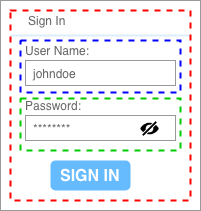
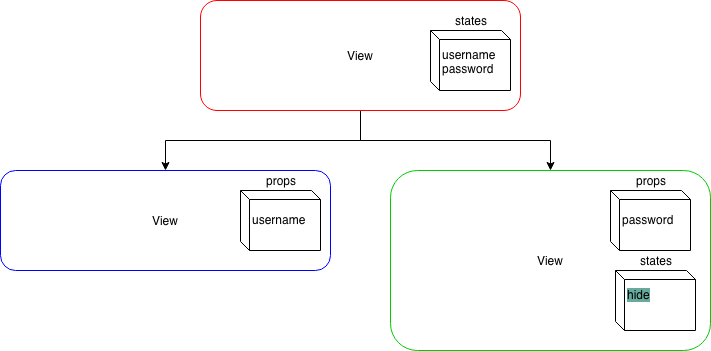
把 username 和 password 分成兩個 component後,關於 hide 值就有二種可能的 component tree 設計。
-
(component tree 1) 放在 password component 中的 state
-
(component tree 2) 放在最上層 component 中的 state,然後在送到 password component 的 prop
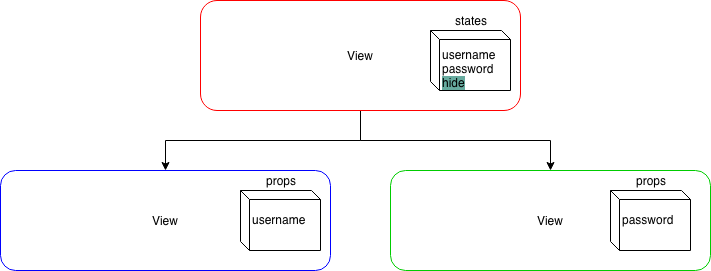
假如當使用者按下 SIGN IN 時,希望密碼是隱藏的也就是 hide 需要更動。因為 SIGN IN 是在最上層的 component, 在上面 component tree 1 就會有設定上的困難(因為 state 是在 password component 內部),component tree 2 反而沒有。
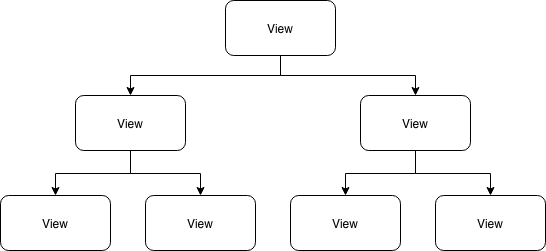
試想當你的 component tree 更大時,你應該怎麼管理那些 state 呢?
目標
今天會介紹 Flux framework 和 Redux。
我覺得不要一開始就想要馬上把 Redux 和 React 串起來,因為你會誤以為 Redux 很複雜。我在本篇未會給出一個直接運作 Redux 的 Node.js 專案,裡面只有一隻程式,執行過程就是 Redux api 的最簡單的範例。
明天才會把 Redux 和 React 串起,你會看到 store, action 被拆到不同的檔案。
Flux framework
Facebook 提出了 Flux framework(或稱架構),來處理 state 和 prop 的混亂。
Flux 的核心思想
Flux 希望資料的流動是單一的 (單向資料流),使用者行為會產生 Action 送入 Dispatcher,Dispatcher 會把 Action 派分到「有註冊要監聽Action的 Store」,然後 Store 依照 Action 的 識別字串 決定如何修改 state,當 Store 修改完 state,會發出 change 訊息。最後, 註冊 change 訊息的 View ,收到來自 Store 的通知,就會執行 setState() 更新畫面(更新內部的component)。
它的流程如下:
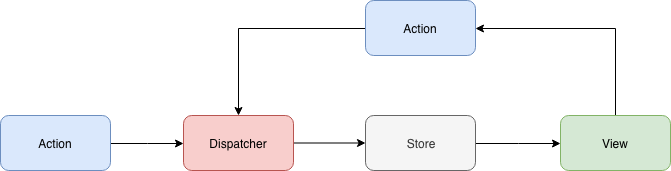
- Action:一次修改 state 的行為
- Dispatcher:分派 Action 到 Store 的單元
- Store:實際存 state 的單元
- View:接收 state 並渲染畫面
Flux 的特性
- 資料流動的框架:從 Flux 流程上看, Flux 和 React 其實是沒有關連性的,因為它是提出資料流動的框架,跟畫面渲染無關。
- 單向資料流:要修改 state 沒有其它方法,只能引起一個 Action
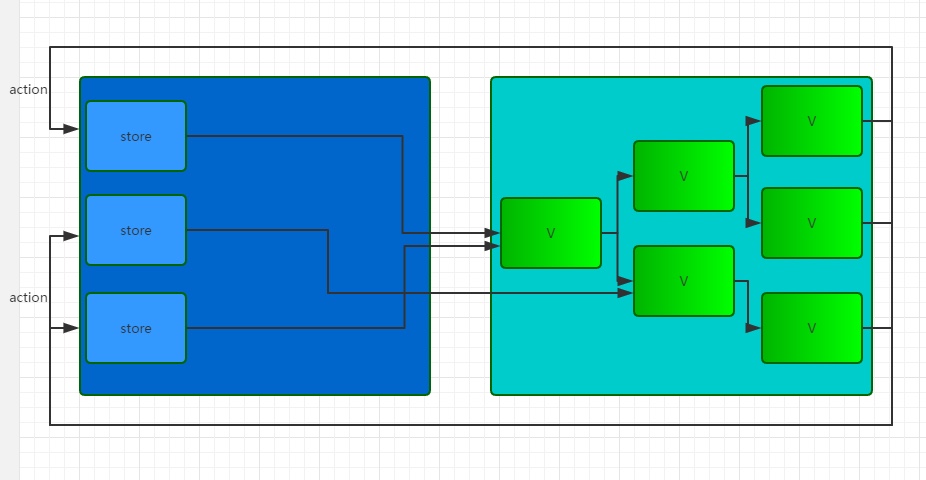
- 單元非指向性:每個區塊都是獨立運作的,像是: 一個 Dispatcher 能被多個 Store 註冊、不同 View 可以監聽不同的 Store,任一個單元想接誰就接誰,沒有限定某一個store 只能接某一個 view。
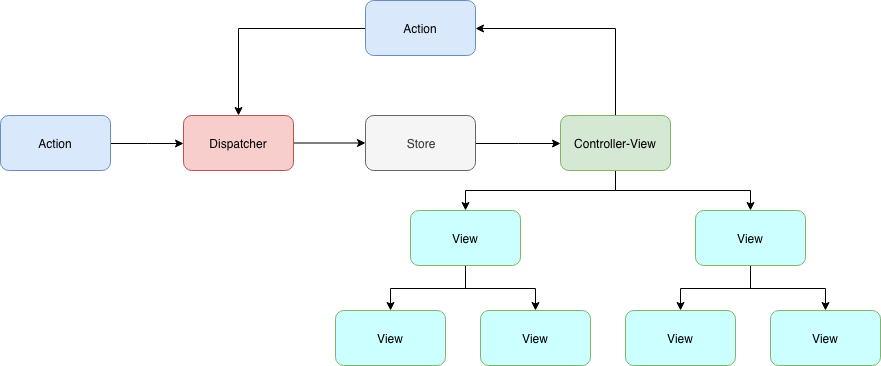
我們注意看到「註冊 Store 的(change)訊息的 View」,它是 state 值流入的第一個 view,被稱成 Controller-View 它負責連結 Store 取出 state 值和引起 setState(),然後送入裡面的 view (即內部 view 的 props)。最後的架構圖如下:
Flux 的實現套件
以下三個都是 Flux 的實現套件,他們的 API 用法和特性有很大的差異
- Facebook Flux:因為保留了Flux「非指向性」的特性,要做比較多 Flux API 串接的操作,用起來不太方更。用法可以看 Flux 架構入門教程。
- Alt:隱藏
Dispatcher的概念,直接把 Action 綁定(bind) 在 Stroe 中,所以 Flux API 串接較方便。用法看官網5分鐘上手就可以了。 - Redux:簡化 Flux 完整的概念,API 不多,是我們要用的
Redux 的特性
原本的 Flux Store 和 View 的關係下圖(截錄淺談 React、Flux 與 Redux)
然而 Redux 簡化 Flux 的概念,變成 (截錄修改淺談 React、Flux 與 Redux)
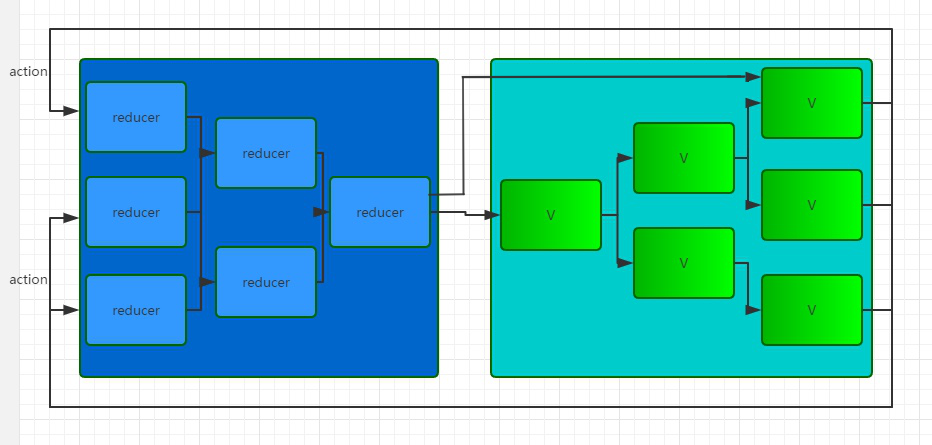
- 只有一個 Store:所有 state 放在一個全局的 store 中。這也是最大的差別,不同於 Flux Store 可以有多個 Store,它們各自為戰。
- 只有一個 Dispatcher:因為只有一個 Store ,所以全局也只需要有一個 dispatcher,它被隱藏在 store 中。只需
store.dispatch(action)就可以引發分派 action。 - 引入 Reducer 概念:
- 實際存放 state 的地方
- store 收到 action 時,reducer 會依照 action type 處理 state 的改變
- reducer是純函數(pure function):同樣的輸入會有同樣的輸出
1const initState = {}; 2const reducer = (state = initState, action) => { 3 const {type, ...actionData} = action; 4 switch (type) { 5 default: 6 return state; 7 } 8}; - 只有一個根 reducer 對應 controller-view,其它的 reducer 會被合併,一同管理整個 store。
1// Reducer configuration
2const rootReducer = combineReducers({
3    login: LoginReducer,
4    account: AccountReducer,
5});
注意:這裡不是說只能有一個 controller-view,subcomponent 也能是 controller-view
所以 Reducer 簡化 Flux 完整的概念,更容易使用。
體驗 Redux 的運作
Redux 是資料的流動,是改變 state 的框架,最後的 state 給誰用跟它沒有關係,View 是與它無關。因此,React 跟它的運作是沒有關係的。我們可以開一個 Node.js 來運作體驗 Redux。
- 開一個空的 Node.js 專案,取名為
hello-redux - 初使化專案
npm init後,安裝 reduxnpm install redux --save - 建一個
hello-redux.js檔案 - 初使化 Redux,建立 store。我們假設 store 有一個
messagestate。 建立 store 需要一個 root reducer,而 root reducer 當收到某個 action 後,會看 action type 修改 state1const {createStore} = require('redux'); 2 3// 定義 action type 4const identityChangeMessage = 'CHANGE_MESSAGE'; 5 6// 建立一個 Reducer 7const initState = { 8 message: 'init message', 9}; 10const reducer = (state = initState, action) => { 11 const {type, payload} = action; 12 switch (type) { 13 case identityChangeMessage: { 14 const {message} = payload; 15 return Object.assign({}, {message}); 16 } 17 default: 18 return state; 19 } 20}; 21 22// 建立一個 Store 23const store = createStore(reducer); - 印出初始的 state:
store.getState()可以取出目前的 state1// 印出初始的 state 2console.log(store.getState()); - 建立 action
這裡我們要強調,在 Redux 中:
1// 建立一個 action 2const action = { 3 type: identityChangeMessage, 4 payload: { 5 message: 'change', 6 }, 7}- 一個 action 是一個 object,一般會帶有
type屬性。 - 一個 action creator 是產生 action 的函數,如:
1function changeMessage(data) { 2 return { 3 type: identityChangeMessage, 4 payload: { 5 message: data, 6 }, 7 } 8}
- 一個 action 是一個 object,一般會帶有
- 分派(dispatch) action
分派 action 出去後,reducer 會收到 action,然後依照 action type (
1store.dispatch(action);identityChangeMessage) 修改 state - 印出收到 action 後,被 reducer 修改的 state
1console.log(store.getState());
執行 node hello-redux.js 的結果:
1{ message: 'init message' }
2{ message: 'change' }
總結
今天介紹了 Flux 的基本概念和實現它的套件 Redux,也寫了簡單的程式體驗 Redux 的運作。明天就把 Redux 和 React 串接起來。
附錄
完整的 hello-redux.js
 1const {createStore} = require('redux');
 2
 3// 定義 action type
 4const identityChangeMessage = 'CHANGE_MESSAGE';
 5
 6// 建立一個 Reducer
 7const initState = {
 8  message: 'init message',
 9};
10const reducer = (state = initState, action) => {
11  const {type, payload} = action;
12  switch (type) {
13      case identityChangeMessage: {
14        const {message} = payload;
15        return Object.assign({}, {message});
16      }
17      default:
18          return state;
19  }
20};
21
22// 建立一個 Store
23const store = createStore(reducer);
24
25// 印出初始的 state
26console.log(store.getState());
27
28// 建立一個 action
29const action = {
30 type: identityChangeMessage,
31 payload: {
32 message: 'change',
33 },
34}
35
36// 分派(dispatch) action
37store.dispatch(action);
38
39// 印出收到 action 後,被 reducer 修改的 state
40console.log(store.getState());
評論