React 快速入門
回憶
昨天我們以非同步函數測試的例子說明單元測試/整合測試的差異,到目前為止後端的部分打算先到這。之後的幾天,我們開始進入研究前端。
目標
在 Day 11 - 一周目- 開始玩轉前端(二) 中,我們用 create-react-app 建立了前端專案,並打出非同步的 request 向後端索取資料。
- 如何找專案結構
- React 必需知道的事
state和prop的差異- React component lifecycle (生命周期)
- React 的效能議題
- 小心的在
render()中用箭頭函數 key屬性在動態的 react element array 應該要使用
- 小心的在
如何找專案結構?
我們用 create-react-app 建立了前端專案,它幫我們產生了專案,資料夾如下:
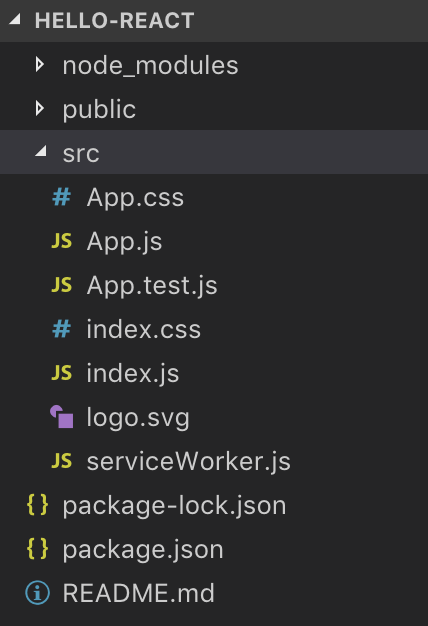
除了自己組識,上網找別人做好的也是個不錯的選擇,很多人會把初始專案結構放在 github 之類的,不過你得先知道你想要的組合套餐
Bundle tool: webpack / gulp UI framework: React / Vue.js State container: Redux / Vue.js Asynchronous flow: redux-observable(rxjs) / redux-saga CSS extension: sass / less
每個套件都有自己的特色、能不能搭配的問題、全部套件怎麼串起來、串起來的資料夾要怎麼組織…等問題,所以只能按照自己的需求查。
例如,上 google 查 webpack react redux sass,會看到
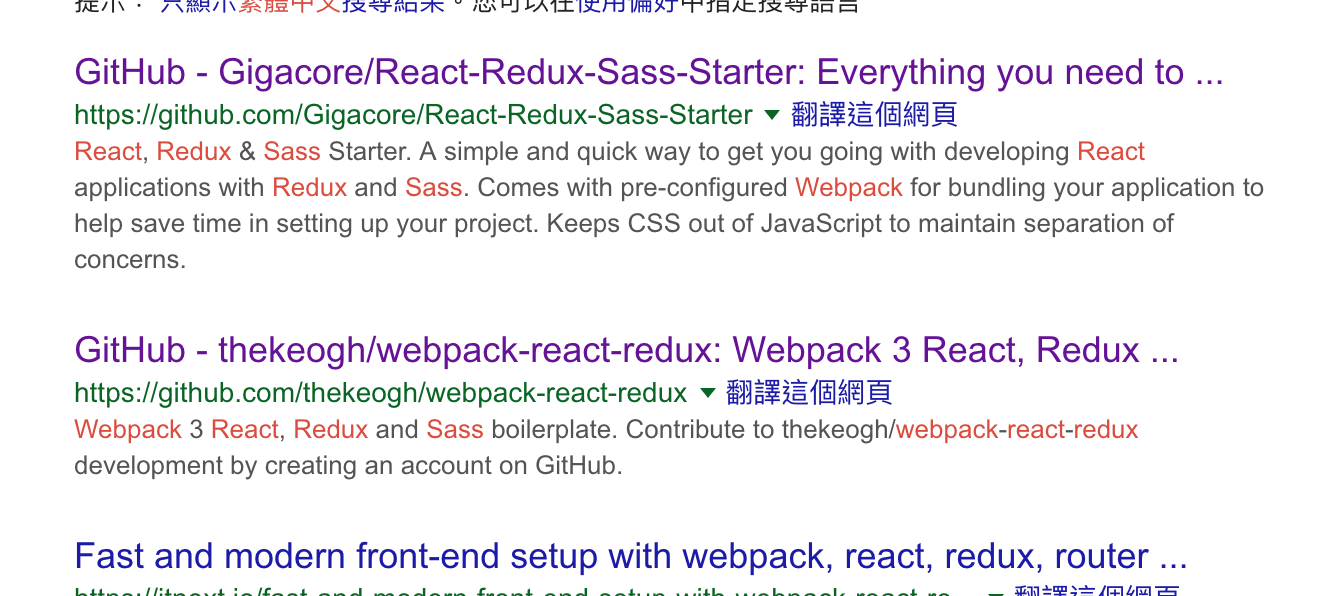
把它們下載看看,它們怎麼組織專案的
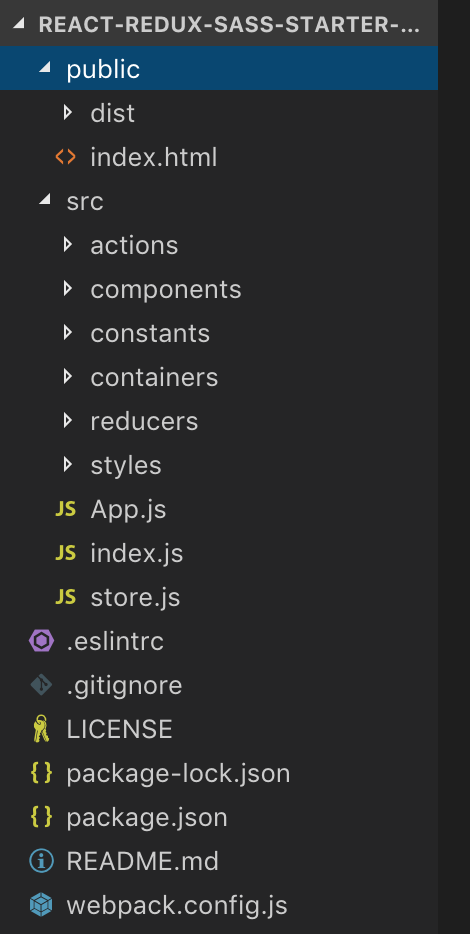
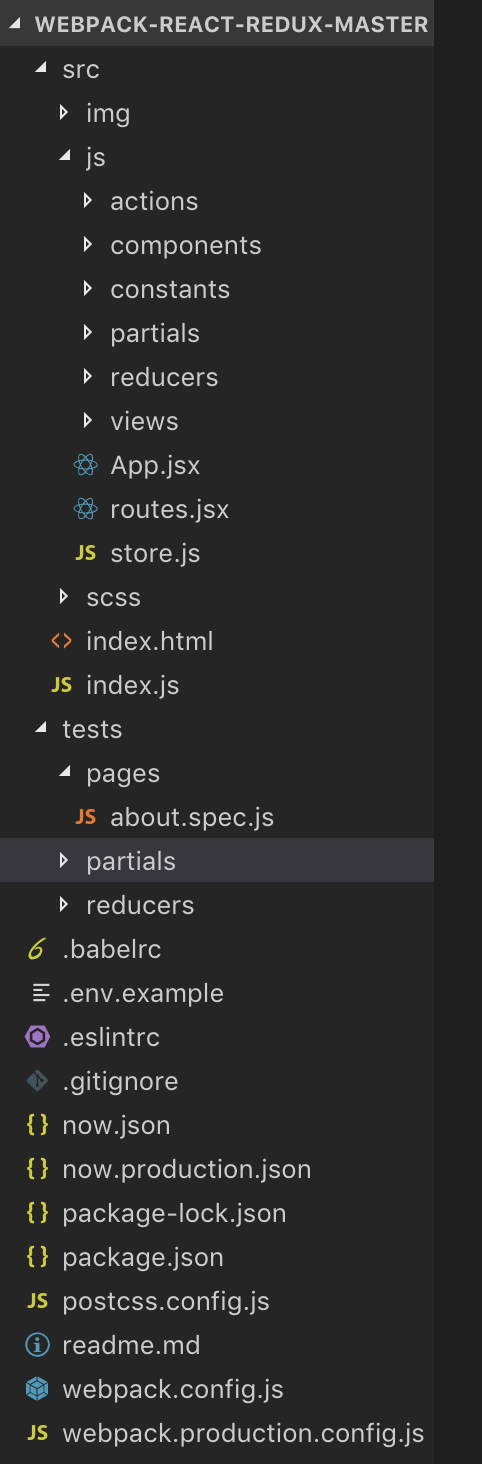
學習最快的方法就是模仿,從別人做好的專案架構學習、查文件資料,會學的很快的。
不過我們目前還是用 create-react-app 建立前端專案,沒有要下載別人的,未來會慢慢的建立起自己的專案架構。
網頁基本知識
HTML 和 CSS 基本知識可以自行上網查,但有點東西我覺得要了解才可以:
- HTML Tags:
<div />、<input> - HTML Attributes:
style,class - HTML Event Attributes:
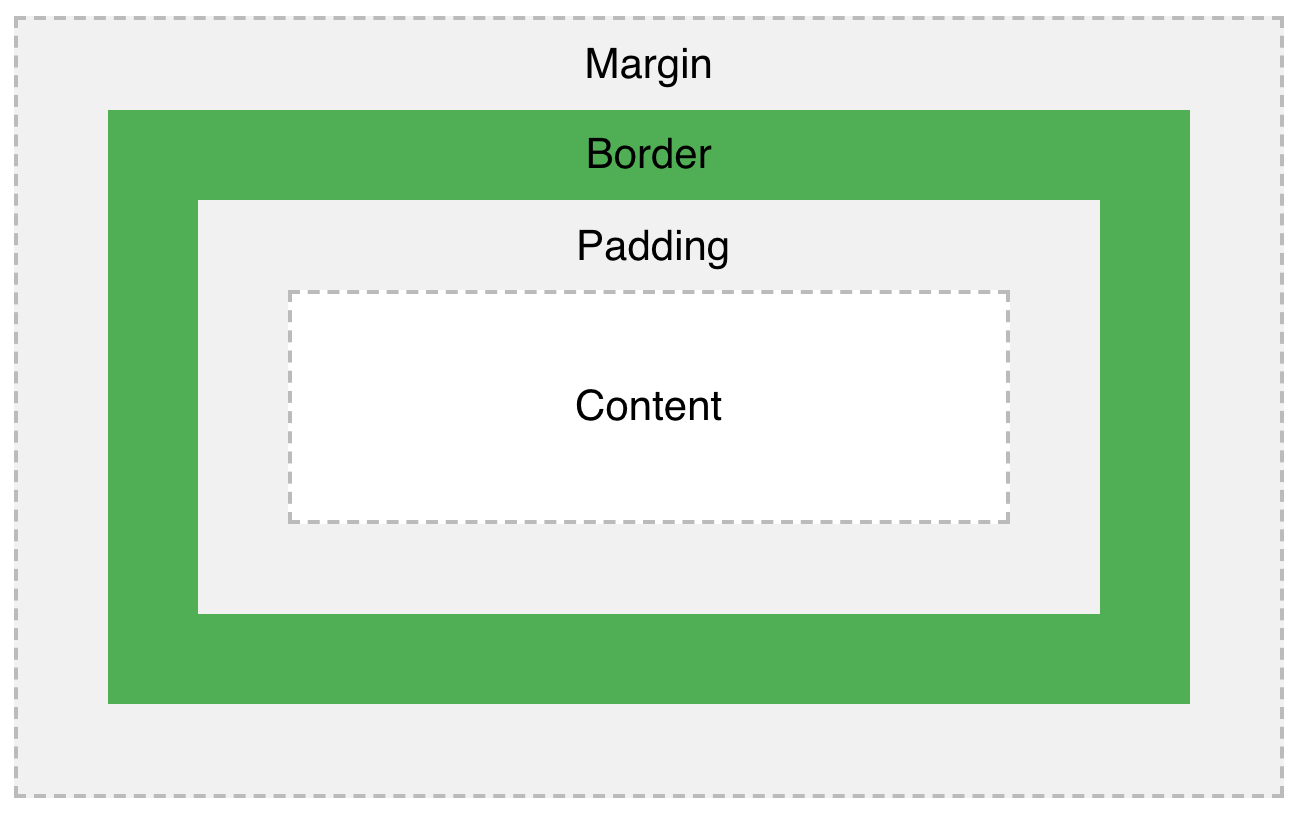
onClick - CSS: Box Model (圖來自CSS Box Model)
剩下的東西我覺得想要什麼再查就可以了。
下接來,我們要回到 javascript 的部分:前端框架 React
React 必需知道的事
我們已經在 Day 10- 一周目- 開始玩轉前端(一)介紹過 React,之後會針對一些重要的概念說明。
每個 React component class 都有 state. prop (props.children)
我們舉個例子:
 1class LoginBox extends React.Component {
 2    render() {
 3        return (
 4            <div>
 5                <button onClick={this.props.onClickButton}>送出</button>
 6            </div>
 7        );
 8    }
 9}
10
11class App extends React.Component {
12  constructor(props) {
13    super(props);
14    this.handleClick = this.handleClick.bind(this); // 讓 handleClick() 裡的 this 是 App 自已
15  }
16
17  state = {
18    message: '',
19  }
20
21  handleClick() {
22    this.setState({
23      message: 'hi',
24    });
25  }
26
27  render() {
28    return (
29      <div>
30        {this.state.message}
31        <LoginBox onClickButton={this.handleClick} />
32      </div>
33    )
34  }
35}
請特別注意
this.handleClick = this.handleClick.bind(this)這行,它一定要寫,因為引起this.props.onClickButton(或者說this.handleClick) 執行的人不是App,所以handleClick裡面的this不是指向App。因此,在constructor()中用bind(this),可以把this綁定成App,如此this.setState()才能使用。
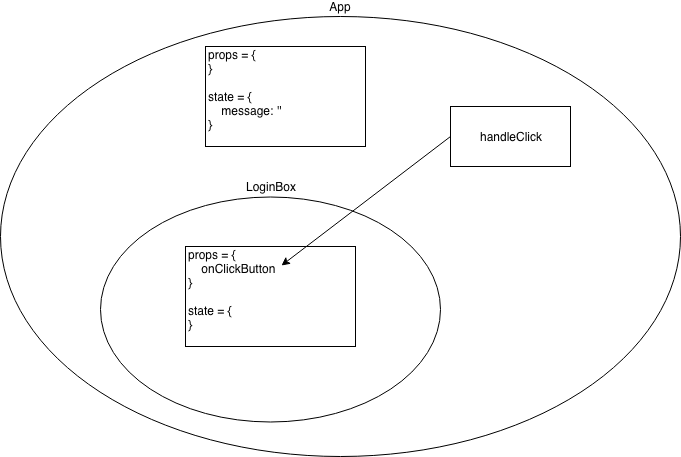
LobinBox 和 App 它們各自有兩個一定有的屬性:
props: 是由呼叫者(caller)所送入元件中。例如LobinBox的onClickButton的值是由App在render()時送入。props在LoginBox中不會改變,從LoginBox角度看,props就像是常數。state: 是元件本身的狀態,它會隨著時間或行為改變。例如App的state.message點擊<button />後會執行this.props.onClickButton,又因為其值是App中的handleClick,所以handleClick()會執行,導致setState()執行使App的state.message改變。
另外,props.children 這個很特別,它指向被 component 包著的內容,見下面
 1class LoginBox extends React.Component {
 2    render() {
 3        return (
 4            <div>
 5                <h3>in LoginBox</h3>
 6                {this.props.children}
 7                <button onClick={this.props.onClickButton}>送出</button>
 8            </div>
 9        );
10    }
11}
12
13class App extends React.Component {
14  ...略
15  render() {
16    return (
17      <div>
18        {this.state.message}
19        <LoginBox onClickButton={this.handleClick}>
20          <div>{this.state.message}</div>
21        </LoginBox>
22      </div>
23    )
24  }
25}
LoginBox 裡面的 this.props.children 等於在 App 中被 LoginBox 標籤包著的所有內容。因此,為了渲染被 LoginBox 包著的內容,必需在 LoginBox 的 render 中 {this.props.children} 渲染,不然就看不到裡面的東西。
React component lifecycle (生命周期)
它們是 component 的在建立和渲染的過程 (見官方文件:Component lifecycle),以 component class 出發,react 會做以下的過程:

依照 component 被掛入 DOM 的過程分類,過程中會依序執行 component 的函數如下:
- Mounting:component 被建立實體(即 react element)後,渲染到 DOM 的過程
constructor()static getDerivedStateFromProps()render()componentDidMount()
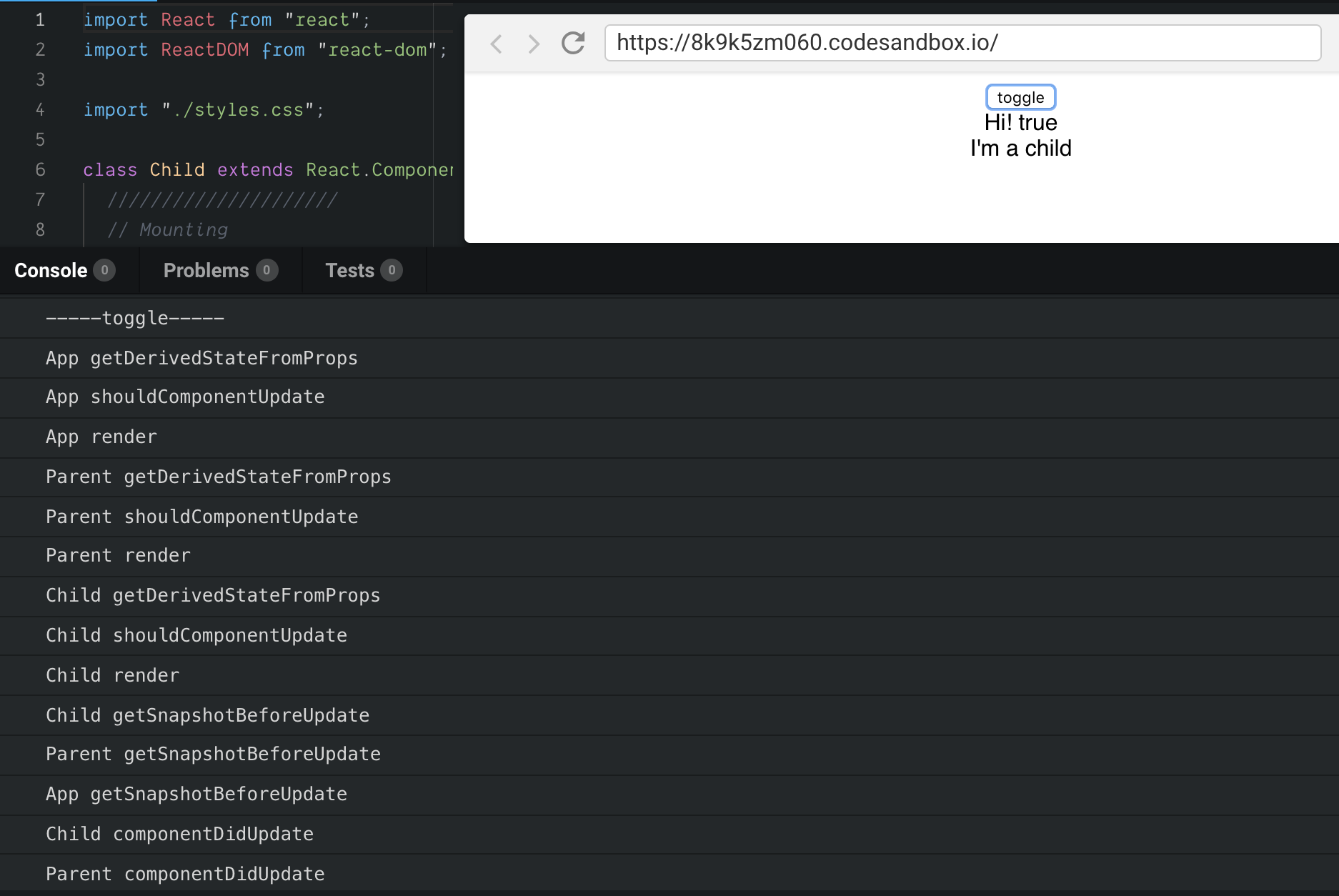
- Updating:當 component 收到新的 props 時,更新狀態(state),再重渲染到 DOM 的過程
static getDerivedStateFromProps()shouldComponentUpdate()render()getSnapshotBeforeUpdate()componentDidUpdate()
- Unmounting:當 component 不被使用,從 DOM 移除的過程
componentWillUnmount()
- Error Handling:當 component 錯誤發生時
componentDidCatch()
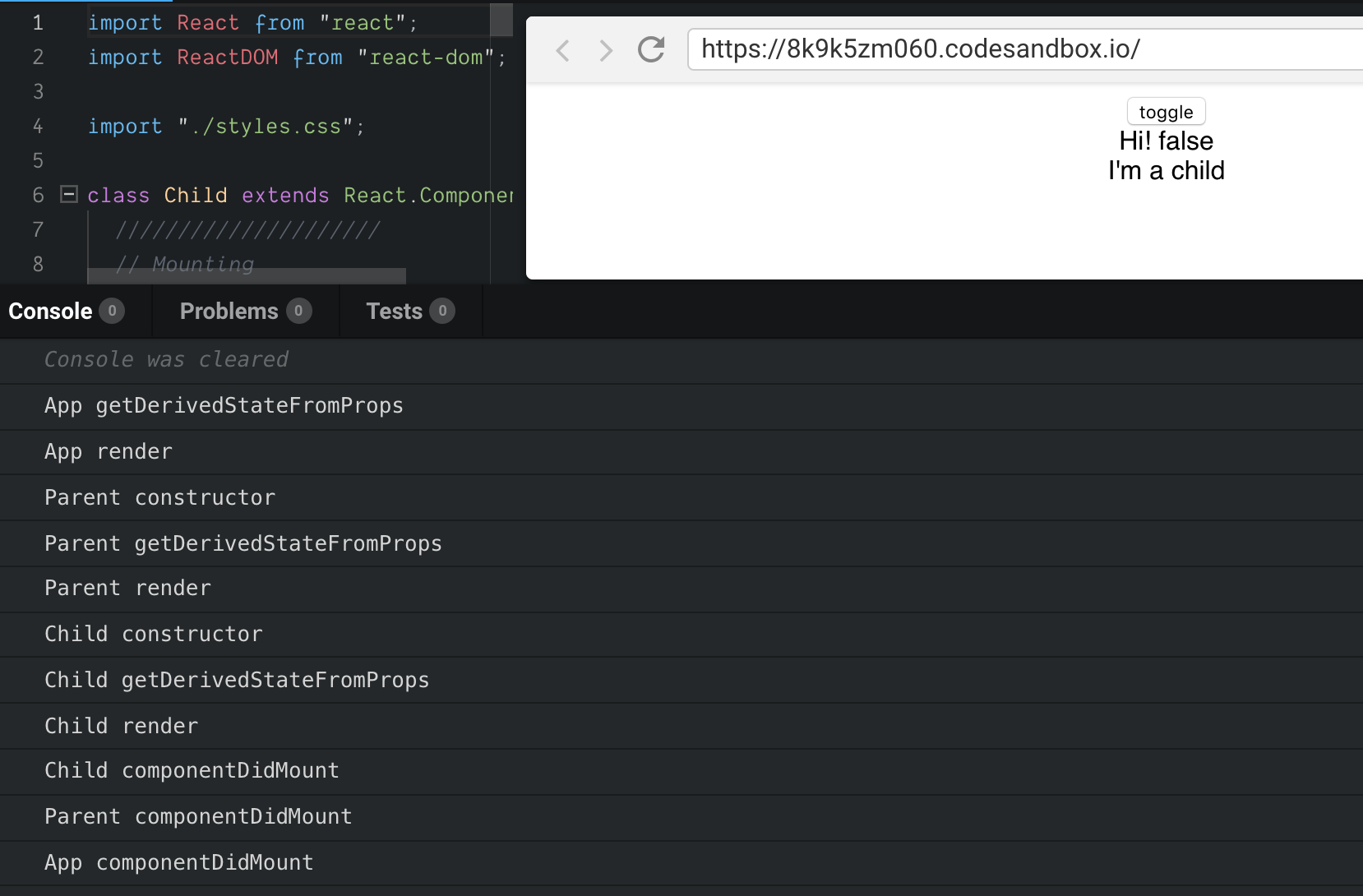
Live Demo - React lifecycle
範列中把所有的過程都印了出來,可以去看看
當你按下 toggle,就會看到 Updating 的過程
我們雖然不會一一解釋它們,但有東西要釐清一下:
getDerivedStateFromProps(props, state)是指由使用者送入的props(可能是Mounting 或 Updating 發生) 和目前 compoent 的state產生新的state。我們之前過state是 compoent 本身的狀態,當有新props來到時自然需要改變。render()- 不單只能回傳一個 react element,它可以回傳更多型態(見
render()。不過,比較常回傳一個 react element 或 react element array。 - 一般而言,
render()回傳的 react element,只能有最上層的標籤但1render() { 2 reutrn <root>{...}</root> 3}React.Fragment可以讓你放更多 react element1render() { 2 return ( 3 <React.Fragment> 4 <ChildA /> 5 <ChildB /> 6 <ChildC /> 7 </React.Fragment> 8 ); 9}
- 不單只能回傳一個 react element,它可以回傳更多型態(見
componentDidMount()是react element 掛入 DOM 後才會被執行,適合拿來做為要求後端資料的觸發點getSnapshotBeforeUpdate()回傳的值,會在componentDidUpdate(prevProps, prevState, snapshot)的參數拿到。可以拿來保留畫面更新前的資料。
React 的效能議題
在 render() 中用箭頭函數:每次都有新的函數
以前面的例子:
1<LoginBox onClickButton={this.handleClick}>
2  <div>{this.state.message}</div>
3</LoginBox>
你可以寫成
1<LoginBox onClickButton={() => {
2    this.setState({
3      message: 'hi',
4    });
5}}>
6  <div>{this.state.message}</div>
7</LoginBox>
是可以這樣做,也不用 .bind(this) 了,但要知道每次 render() 都會重新產生一個新的函數,有時對效能不是很好。因此,可以使用 this.handleClick 這個成員函數,這個就只有一個實體。記得! 若在this.handleClick實作中要用到 this,要記得 .bind(this)。
Key Attribute 會用在 React Virtual DOM 比較:動態 react element array 要加 key
我們考慮 react element 放在 array 中,React Virtual DOM 在進行比較(新舊React Virtual DOM 比較)決定是否要更新 DOM 時,它可能會參考屬性 key,這東西很特別。
沒有用 key 的 react element
 1          if (this.props.toggle) {
 2            return (
 3              <div>
 4                <Child text="3" />
 5                <Child text="4" />
 6                <Child text="5" />
 7              </div>
 8            );
 9          } else {
10            return (
11              <div>
12                <Child text="3" />
13                <Child text="5" />
14              </div>
15            );
16          }
React Virtual DOM比較時是按照順序,若 toggle 從 false 到 true:
| false -> true | false | true | true -> false |
|---|---|---|---|
| updating | <Child text="3" /> |
<Child text="3" /> |
updating |
| updating | <Child text="5" /> |
<Child text="4" /> |
updating |
| mounting | null | <Child text="5" /> |
unmounting |
一開始toggle = false
1Child => 3 constructor
2Child => 3 getDerivedStateFromProps
3Child => 3 render
4Child => 5 constructor
5Child => 5 getDerivedStateFromProps
6Child => 5 render
7Child => 3 componentDidMount
8Child => 5 componentDidMount
由 false -> true
 1Child => 3 getDerivedStateFromProps
 2Child => 3 shouldComponentUpdate
 3Child => 3 render
 4Child => 4 getDerivedStateFromProps
 5Child => 5 shouldComponentUpdate
 6Child => 4 render
 7Child => 5 constructor
 8Child => 5 getDerivedStateFromProps
 9Child => 5 render
10Child => 3 getSnapshotBeforeUpdate prev =3       -> updating, 一樣留著
11Child => 4 getSnapshotBeforeUpdate prev =5       -> updating, 之前是 5
12Child => 3 componentDidUpdate
13Child => 4 componentDidUpdate
14Child => 5 componentDidMount                     -> mounting, 5
由 true -> false
 1Child => 3 getDerivedStateFromProps
 2Child => 3 shouldComponentUpdate
 3Child => 3 render
 4Child => 5 getDerivedStateFromProps
 5Child => 4 shouldComponentUpdate
 6Child => 5 render
 7Child => 3 getSnapshotBeforeUpdate prev =3       -> updating, 一樣留著
 8Child => 5 getSnapshotBeforeUpdate prev =4       -> updating, 之前是 4
 9Child => 5 componentWillUnmount                  -> unmounting, 5
10Child => 3 componentDidUpdate
11Child => 5 componentDidUpdate
當有 key 的 react element
 1          if (this.props.toggle) {
 2            return (
 3              <div>
 4                <Child key="b3" text="b3" />
 5                <Child key="b4" text="b4" />
 6                <Child key="b5" text="b5" />
 7              </div>
 8            );
 9          } else {
10            return (
11              <div>
12                <Child key="b3" text="b3" />
13                <Child key="b5" text="b5" />
14              </div>
15            );
16          }
當 react element key 新舊 key 都一樣,表示 DOM element 存在,只要進行 DOM element 更新 當 react element key 新出現,表示要進行插入新的 DOM element。 當 react element key 在新的 React Virtual DOM 消失,表示移除 DOM element。
| false -> true | false | true | true -> false |
|---|---|---|---|
| updating | <Child key="b3" text="3" /> |
<Child key="b3" text="3" /> |
updating |
| mounting | null | <Child key="b4" text="4" /> |
unmounting |
| updating | <Child key="b5" text="5" /> |
<Child key="b5" text="5" /> |
updating |
一開始toggle = false
1Child => b3 constructor
2Child => b3 getDerivedStateFromProps
3Child => b3 render
4Child => b5 constructor
5Child => b5 getDerivedStateFromProps
6Child => b5 render
7Child => b3 componentDidMount
8Child => b5 componentDidMount
由 false -> true
 1Child => b3 getDerivedStateFromProps
 2Child => b3 shouldComponentUpdate
 3Child => b3 render
 4Child => b4 constructor
 5Child => b4 getDerivedStateFromProps
 6Child => b4 render
 7Child => b5 getDerivedStateFromProps
 8Child => b5 shouldComponentUpdate
 9Child => b5 render
10Child => b3 getSnapshotBeforeUpdate prev =b3             -> updating, 一樣留著
11Child => b5 getSnapshotBeforeUpdate prev =b5             -> updating, 一樣留著
12Child => b3 componentDidUpdate
13Child => b4 componentDidMount                            -> mounting, 4
14Child => b5 componentDidUpdate
由 true -> false
 1Child => b3 getDerivedStateFromProps
 2Child => b3 shouldComponentUpdate
 3Child => b3 render
 4Child => b5 getDerivedStateFromProps
 5Child => b5 shouldComponentUpdate
 6Child => b5 render
 7Child => b3 getSnapshotBeforeUpdate prev =b3             -> updating, 一樣留著
 8Child => b5 getSnapshotBeforeUpdate prev =b5             -> updating, 一樣留著
 9Child => b4 componentWillUnmount                         -> unmounting, 4
10Child => b3 componentDidUpdate
11Child => b5 componentDidUpdate
Key Attribute 小總結
- 一般我們不用刻意的設定 key 值,React 會儘量的重新使用 DOM element,但
- 若你的 react element array 是會動態改動的,最好加入
key。React 也會對沒加key的 react element array 發出警告,因為不加key可能會使舊的 react element 留下來,它可能會有殘留的prop/state導致畫面殘留。
總結
今天我們先談了如何找前端專案結構,再深入談 React 的 state 和 prop ,以及生命周期。最後以箭頭函數和 key 屬性的效能議題做為結尾。
評論