專案結構介紹、了解如何重構,將商務邏輯拆的更細
回憶
昨天我們使用Node.js Driver 操作 MongoDB,寫出下面的程式
 1const MongoClient = require('mongodb').MongoClient;
 2
 3// 建立連線
 4const url = 'mongodb://localhost:27017';
 5const dbName = 'myproject';
 6const client = new MongoClient(url, {useNewUrlParser: true});
 7client.connect()
 8  .then((connectedClient) => {
 9    console.log('mongodb is connected');
10  })
11  .catch(error => {
12    console.error(error);
13  });
14
15// GET /api/mongo
16router.get('/api/mongo', function (req, res, next) {
17  // 回應
18  res.json({
19    isConnected: client.isConnected(),
20  });
21});
22
23// GET /api/echo
24router.post('/api/echo', function (req, res, next) {
25  const body = req.body;
26
27  // 處理
28  const worker = (async function (data) {
29    const db = client.db(dbName);
30    const collection = db.collection('echo');
31    const result = await collection.insertOne(data);
32    console.log(result);
33    return result;
34  })(body);
35
36  // 回應
37  worker.then(() => {
38    res.json(body);
39  })
40    .catch(next);
41});
會出現以下問題:
- 萬一我們的 client,要在別的地方用怎麼辨?
- 明明是
.src/router/index.js路由的程式,為什麼會放資料庫連線邏輯? - 這種混雜的各種邏輯的程式要怎麼寫測試、維護?
目標
要解決以上問題需要從專案結構下手,跟程式語言沒什麼關係。
- 專案結構介紹
- 了解如何重構,將商務邏輯拆的更細
因為後端的目地、功能的見解、認知不同,每個人做出的專案結構一定會不一樣,這是正常的。
express 的專案結構
打開 hello-mongo,我們先來看看 express 給我們預設的專案結構
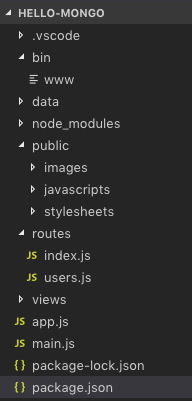
- bin : Node.js 入口程式資料夾
- www : Web Server 的入口
- public : 存放靜態的檔案資料夾
- routes : 路由資料夾
- index.js :
/路由的根目路 - users.js : 其它路由的範例程式
- index.js :
- views : 網頁樣版 (我們的後端是 application server,不太用的到,不理它)
- error.hbs : 錯誤發生的網頁樣版
- index.hbs : 首頁的網頁樣版
- layout.hbs : 網頁的 layout
- app.js : 應用程式的初始化設定
express 提供基本的 Web Server 應該要有的目錄,但我們的後端顯然不夠,我們修改成以下
- bin : Node.js 入口程式資料夾
- www : Web Server 的入口
- public : 存放靜態的檔案資料夾
- middlewares : 中間件(middleware)資料夾
- routes : 跟它同義的有 controller。路由資料夾
- index.js :
/路由的根目路 - users.js : 其它路由的範例程式
- index.js :
- app.js : 應用程式的初始化設定
- services : 服務模組資料夾
- daos : 資料存取模組資料夾
- utilities : 共用工具資料夾
我們多出了,middlewares、services、daos、utilities,
middlewares、services、daos、utilities 的職責概述:
- middlewares : 提供 router 使用的中間件
- services : 提供 router 使用的模組,函數定義時常會 Web API 有關。可以使用其它 service 和 dao。
- daos : data acess object,跟它同義的有 repositories / models(mongoose常用)。提供資料存取用,要跟資料庫互動。
- utilities : 常用的工具庫,整個專案都有可能使用,所以應該要減少相依。常是一些小工具,像是:
formatDate(date)。
我們依照職責概述重構程式
重構 GET /api/mongo
重構過程見 ithelp-30dayfullstack-Day16 網頁版專案 codesandbox(只能看檔案,不能執行) 我們約定:
- 類別為
MongoClient時,建立的物件會取為mongoClient,依些類推
把資料庫連線放到 app.js
 1const MongoClient = require('mongodb').MongoClient;
 2const url = 'mongodb://localhost:27017';
 3const dbName = 'myproject';
 4const client = new MongoClient(url, { useNewUrlParser: true });
 5client.connect()
 6  .then((connectedClient) => {
 7    console.log('mongodb is connected');
 8  })
 9  .catch(error => {
10    console.error(error);
11  });
資料庫連線放在 app.js ,因為後端一啟動就一定要連上,不然就後面都不用玩了。
./routers/index.js 控制反轉(Inversion of Control)
我們用 createRouter(dependencies) 包住整個程式碼,給外界注入相依後才建立 router 物件。
./routers/index.js 相依的是 client,改成在 app.js 中才用 createRouter({client}) 注入
 1/**
 2 *
 3 * @param {MongoClient} client
 4 */
 5function createRouter(dependencies) {
 6  // Get dependencies
 7  const {client} = dependencies;
 8  if(!client) {
 9    throw new Error('client is empty');
10  }
11
12  // Create a router
13  var router = express.Router();
14
15  /* GET home page. */
16  router.get('/', function (req, res, next) {
17    ...略
18  });
19
20  router.get('/api/sayHi', function (req, res, next) {
21    ...略
22  });
23
24  router.post('/api/echo', function (req, res, next) {
25    ...略
26  });
27
28  router.get('/api/mongo', function (req, res, next) {
29    ...略
30  });
31
32  const mongoose = require('mongoose');
33  router.get('/api/mongoose', function (req, res, next) {
34    ...略
35  });
36
37  return router;
38}
39
40module.exports = {
41  createRouter
42};
然後修改使用./routers/index.js 的 app.js
1...略
2const indexRouter = require('./routes/index');
3...略
4app.use('/', indexRouter);
5...略
改成
1...略
2const {createRouter: createRootRouter} = require('./routes/index');
3const indexRouter = createRootRouter({client});
4...略
5app.use('/', indexRouter);
6...略
建立 MongoSevice class,放在 ./services/MongoSevice.js
 1class MongoService {
 2    /**
 3     *
 4     * @param {MongoClient} mongoClient
 5     */
 6    constructor({mongoClient}) {
 7        this.mongoClient = mongoClient;
 8    }
 9
10    /**
11     *
12     * @returns Promise<bool>
13     */
14    isConnected() {
15        return Promise.resolve(this.mongoClient.isConnected())
16    }
17}
18module.exports = MongoService;
我們把 GET /api/mongo 的實作放在 MongoService 的 isConnected()。
./routers/index.js 使用 MongoService 物件
多增加一個 MongoService的依賴項,mongoService 是 MongoService 物件。
 1/**
 2 *
 3 * @param {object} dependencies
 4 * @param {MongoService} dependencies.mongoService
 5 * @param {MongoClient} dependencies.client
 6 */
 7function createRouter(dependencies) {
 8  // Get dependencies
 9  const { client, mongoService } = dependencies;
10  if (!client) {
11    throw new Error('client is empty');
12  }
13  ...略
14}
GET /api/mongo 改成使用 MongoService 物件
1 router.get('/api/mongo', function (req, res, next) {
2    mongoService.isConnected()
3      .then(isConnected => {
4        res.json({isConnected});
5      })
6      .catch(next);
7  });
最後,在 app.js 建立 MongoService 物件並注入
1const MongoService = require('./services/MongoService');
2
3const mongoService = new MongoService({mongoClient: client});
4const {createRouter: createRootRouter} = require('./routes/index');
5const indexRouter = createRootRouter({client, mongoService});
我們總結一下,我們所做的事
- 建立了
MongoService物件,router 會使用MongoService物件完成實作(ex:isConnected())而不是把實作留在 router,router 因該專心對付 web api的介接 - 所有物件的建立被我們移到了
app.js,它們的相依性如下圖(注:這不是UML class diagram,只是表達關係)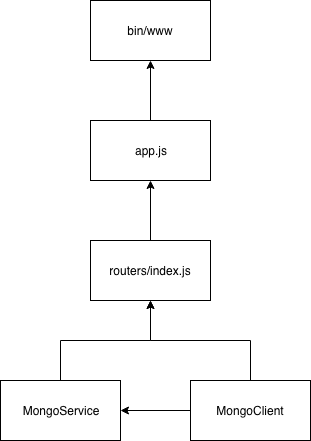
接下來我們可以更進一步重構 POST /api/echo,這樣我們就可以把 ./routers/index.js 對 client 的相依拿掉,讓它只面對 MongoService,之後的相依關係就更單純了。
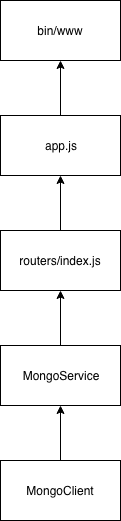
重構 POST /api/echo
把 POST /api/echo 的資料庫操作移到 MongoService 的 insertEcho()
加入 insertEcho()後,移除 POST /api/echo 資料庫操作,且改成使用 MongoService 的 insertEcho()
 1class MongoService {
 2    ...略
 3
 4    /**
 5     *
 6     * @param {*} data
 7     * @returns Promise
 8     */
 9    async insertEcho(data) {
10        const dbName = 'myproject';
11        const db = this.mongoClient.db(dbName);
12        const collection = db.collection('echo');
13        const result = await collection.insertOne(data);
14        console.log(result);
15        return result;
16    }
17}
./routers/index.js 的 POST /api/echo 變成
1  router.post('/api/echo', function (req, res, next) {
2    const body = req.body;
3
4    mongoService.insertEcho(body)
5      .then(() => {
6        res.json(body);
7      })
8      .catch(next);
9  });
移除 ./routers/index.js 對 client 的相依
因為 ./routers/index.js 沒有用到 client,可以移除了,且app.js中也不用注入 clinet了
1const {createRouter: createRootRouter} = require('./routes/index');
2const indexRouter = createRootRouter({mongoService});
我們完成了,得到更單純的關係
提出 DAO
我自可以更進一步重構出更底層的 DAO 出來,例如 EchoDao
建立 EchoDao
 1class EchoDao {
 2    /**
 3     *
 4     * @param {MongoClient} mongoClient
 5     */
 6    constructor({ mongoClient }) {
 7        this.mongoClient = mongoClient;
 8    }
 9
10    insert(data) {
11    }
12}
13
14module.exports = EchoDao;
把 MongoService 的資料章操作移到 insertEcho()
 1class EchoDao {
 2    /**
 3     *
 4     * @param {MongoClient} mongoClient
 5     */
 6    constructor({ mongoClient }) {
 7        this.mongoClient = mongoClient;
 8    }
 9
10    insert(data) {
11        const dbName = 'myproject';
12        const db = this.mongoClient.db(dbName);
13        const collection = db.collection('echo');
14        return await collection.insertOne(data);
15    }
16}
17
18module.exports = EchoDao;
MongoService 使用 EchoDao
加入相依
 1class MongoService {
 2    /**
 3     *
 4     * @param {MongoClient} mongoClient
 5     * @param {EchoDao} echoDao
 6     */
 7    constructor({ mongoClient, echoDao }) {
 8        this.mongoClient = mongoClient;
 9        this.echoDao = echoDao;
10    }
11    ...略
12
13    /**
14     *
15     * @param {*} data
16     * @returns Promise
17     */
18    async insertEcho(data) {
19        return this.echoDao.insert(data);
20    }
21}
22
23module.exports = MongoService;
修改 app.js 中 MongoService 的建立
加入 echoDao 的相依
1const EchoDao = require('./daos/EchoDao');
2
3const echoDao = new EchoDao({mongoClient: client});
4const mongoService = new MongoService({mongoClient: client, echoDao});
重構總結
經過重構 GET /api/mongo 和 POST /api/echo,我們完成了最後的樣子
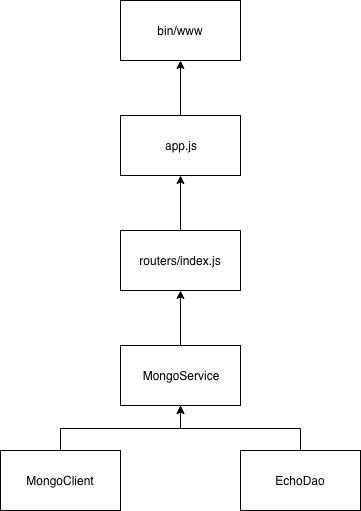
這結構有什麼好處
- 商業邏輯依照職責做分割,加強可維護性
- 易於加入新功能,例如:當使用者打
POST /api/echo時輸入物件時要帶入token屬性值,才可寫入資料庫,我們就可以在MongoService加入這種邏輯。1async insertEcho(data) { 2 const {token} = data; // 省略了值型別的驗証 3 if(token !== 'hello-mongo') { 4 return Promise.reject(new Error('缺少 token')); 5 } 6 return this.echoDao.insert(data); 7} - 因為切割了更多檔案,所以容易多人合作且合併程式碼比較不會衝突
- 這種依賴注入的結構,更方便寫測試
但也有缺點
- 過度設計(Over design),增加程式的複雜度
- 合作時要學習更多的程式碼,過多的類別可能要花時間了解
- 更容易出現過渡函數,像是只把值 by-pass 往下送
但可以改成
1class EchoService { 2 constructor({ echoDao }) { 3 this.echoDao = echoDao; 4 } 5 async insertEcho(data) { 6 return this.echoDao.insert(data); 7 } 8}1class EchoService { 2 constructor({ echoDao }) { 3 this.echoDao = echoDao; 4 this.insertEcho = this.echoDao.insert; 5 } 6}
總結一句話
1當介面越多,越有彈性、但越複雜;彈性不夠,就抽一個介面
mongoose 重構的注意事項
mongoose 也可以進行這類似的重構,doa 可以直接用 model 替換,但有幾點要注意:
const Cat = mongoose.model('Cat', { name: String })是和 mongoose 註冊 model(只需執行一次就可以),跟 mongoose 有沒有 connection 沒關西,只當送出資料庫操作(ex:.save())才會使用到 connection- 要小心 resolve data 的型態。很可能是 model,有時可能要
model.toObject()1 const Cat = mongoose.model('Cat', { name: String }); // 註冊 Cat model 2 router.post('/api/cat', function (req, res, next) { 3 const { name } = req.body; 4 const worker = (async function () { 5 const kitty = new Cat({ name }); 6 7 // 測試一 8 return await kitty.save(); // 回傳 model 型態 9 10 // 測試二 11 // const result = await kitty.save(); 12 // return result.toObject(); // 回傳 ojbect 型態 13 })(); 14 15 worker 16 .then(data => { 17 data._dirty = 'hi'; // 動態放髒東西 18 console.log(JSON.stringify(data)); 19 res.json(data); 20 }) 21 .catch(next); 22 }); - 若把 mongoose 的 Model 當相依注入給 service 使用,service 就要認識 mongoose 的 api (指 mongoose 的類別、函數)。萬一,有人要換別的 ORM(應該不常發生拉),就要所有 service 的實作都要換。因此,自己寫 dao 雖然麻煩,但還是有優點的。
總結
今天我們引入了專案結構,並實際重構 GET /api/mongo 和 POST /api/echo, 讓我們的程式碼更有結構性。
評論